Showing posts with label Adsense. Show all posts

Troubleshooting tips part IV: Ad controls and filtering

We understand that when showing ads on your site, there may be a few you'd like to prevent from appearing. There are a number of ad control and filtering tools in your AdSense account, which we've listed below to help you determine which ones are right for you.
  • Competitive Ad Filter You can enter the specific URL of an ad into the Competitive Ad Filter to prevent ads from that site from appearing on your pages. If you'd like to block ads coming from an entire domain, enter a top-level domain such as www.example.com to block all ads that link to subdirectories below that domain.
  • Ad Review Center The Ad Review Center, located under the AdSense Setup tab in your account, lets you review and filter any placement targeted ads that are appearing on your pages. You can filter ads by type (text or image), or by individual ad groups and advertisers.
  • Category Filtering To use the category filtering feature, you first have to enable the Ad Review Center. Category filtering allows you to block ads from up to 8 categories such as dating, politics, and weight loss, from displaying on your pages. Ads in these categories will be filtered if they're in English, French, German, or Spanish, regardless of how they've been targeted to your pages.
If you still see filtered ads are appearing on your site after you've used these features, please take note of the following:
  • Ad filters should become effective within 30 minutes, but in rare cases might take up to 48 hours to be effective. Review the information in our Help Center for more information.
  • If you use both AdSense for content and AdSense for search, and wish to filter an ad from appearing in both products, make sure that you've entered the correct URL in question in both filters.
  • If you display ads from more than one AdSense account on one page, you need to filter the URL(s) in both accounts.
That brings us to the end of our troubleshooting series for AdSense for content. Stay tuned next week for tips on troubleshooting issues with AdSense for search.. .

Over 4,000 developers at Google I/O 2010

As of today, this year's Google I/O conference has sold out and registration is closed. That means more than 4,000 developers will be joining us on May 19-20 at Moscone West in San Francisco.

Like years past, I/O will feature over 90 in-depth sessions and the opportunity to meet and learn from other developers, including those from the more than 160 companies that will demo in the Developer Sandbox. For those unable to attend, video recordings of technical sessions will be available on YouTube following the conference.

From now until May, we'll continue to list new speakers, new sessions, and new Sandbox participants on the Google I/O website. To keep up with the latest event info and details, follow us on Twitter.

Troubleshooting tips part III: Performance reports & earnings

Once ads are displaying fine on your pages, your next concern may be your earnings. To make sure all your impressions and clicks are recorded correctly, check out the following notes and tips.

First, be aware that your AdSense reports are updated every 15 to 30 minutes, but can sometimes take up to 24 hours to update. So at times, if you don't see the numbers you expect in your reports, be sure to check again later once your reports have been updated.
  • Do you use the Allowed Sites feature? Allowed sites are websites or URLs on which AdSense publishers allow or wish to have their Google ads displayed. If you use the allowed sites feature in your AdSense account, be sure to add all the websites you're displaying ads on, to the list of allowed sites. If you forget to add a sites where you're displaying ads, then impressions and clicks on the sites will be shown in your reports, but advertisers won't be charged and the clicks won't earn any revenue.


  • Do you have channels set up to track your clicks and impressions?
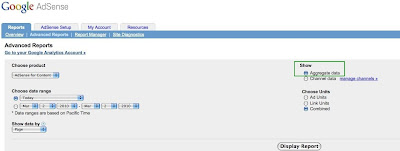
    • If your channel reports show more data than your aggregate reports, it might be the case that your domains or ad units are being tracked simultaneously on multiple URL or custom channels. If that's the case, then to see your complete, accurate statistics, visit your Advanced Reports page. When you select the Aggregate Data radio button and click Display Report, you'll see all clicks, page impressions, and earnings from your account with no duplication of data.
    • Alternatively, you may see that your aggregate reports show more data than your channel reports, even if all your pages are tracked with channels. This can occur sometimes when your page is displayed within a frame; in this case data won't appear in your channel reports but will display in your aggregate reports.


Channel data can be a bit tricky, so make sure to pick distinctive names to differentiate between URL and custom channels -- that way, you'll know exactly what data you're viewing. We also recommend checking out our optimization tips for channels to help you determine which ad units and placements are performing well, and how you can use this information to earn more revenue.
  • If you have ad placements, have you named them accurately? Once you create channels for your ad units or domains, you can turn your custom channels into ad placements that advertisers can specifically target their ads to, using placement targeting. When entering a description for your channels to appear as ad placements, be sure to enter something informative and accurate to represent your site well.
Also, we advise you to be careful when renaming the ad placement as you will lose existing advertiser bids.

Next week, we'll look at publisher controls and how to filter certain ads from appearing on your site.

Attracting new brand advertisers to your site

We’re constantly focused on bringing new advertisers and more advertising spend to AdSense sites. One way to do so is to make it easier for brand advertisers to reach their goals on AdSense sites. Brand advertisers are focused on raising brand awareness and driving engagement, typically with display ads, for a product or service a person may buy in the future. Brand advertisers differ from direct response advertisers, who typically look for clicks and conversions from the campaigns they run on your site.

For example, an advertiser selling DVDs online may want users to click through and make purchases, while a brand advertiser for an upcoming summer blockbuster may want to generaate awareness among users. Because of their campaign goals, brand advertisers tend to be more selective about the sites their ads run on, as well as where on the page their ads appear. We want to help these new advertisers compete for the portions of your ad space that are most attractive to them so that we can increase your earnings over time.

With that in mind, we're launching a new beta advertiser feature that we believe will help accomplish this goal. The new feature enables brand advertisers to target their ads to ad units that are immediately visible when a page is loaded -- in other words, the portions of the page a user can see without needing to scroll down. The ads that are immediately visible are called 'above the fold'; those that require a user to scroll down in order to be seen are called 'below the fold.'

In order to determine which ads are above and below the fold, we've implemented a statistically-driven model. The model takes into account various user experiences and situations, including different web browsers, monitor sizes, and screen resolutions, and only considers ads above the fold if they are fully on-screen when the browser window loads.

If you've placed your ad units above the fold, advertisers using this feature will now be able to reach your site in a new way. If you haven't, placing new ad units above the fold will enable them to do so. We believe this feature will help attract new brand campaigns to AdSense sites, bringing more revenue to publishers over time.

Troubleshooting tips part I: Implementing your ad code

Today, we're beginning a troubleshooting series to help you diagnose and solve common issues with your ads, search boxes, and account functionality. We're kicking things off with a look at how to correctly implement your ad code and an explanation of why ads may not appear on your pages at times.

First, the best way to ensure ads are served correctly is to copy and paste the code exactly as it's provided in your account. Changing the code and manipulating ad behavior aren't permitted by our program policies, and in most cases will prevent your ad from appearing at all.

If you've noticed that your ad units aren't showing ads, here are a few things to check for:
  • Did you just add the code to that page? Relevant ads should appear on your pages shortly after you add the code, but sometimes it can take up to 48 hours for ads to show. This is because our crawler has to visit your page and determine its content so we can serve targeted ads.
  • Does the code on your page match the code in your account? Make sure to copy the code exactly as it appears in your account, and paste it within the body tags of your HTML code. Be sure not to make any changes to the linebreaks of the code (e.g. pasting the code all in one line) as this will break the code and prevent ads from showing entirely.
  • Are you using an HTML editor? Publishers often use a design-enhanced HTML editor like Macromedia Dreamweaver or Microsoft FrontPage (aka WYSIWIG, "what you see is what you get" software). If you use such an editor, you may see errors if you paste your ad code into a WYSIWYG view such as the "Design" or "Layout" view. For the ads to function properly, you'll have to copy and paste the ad code into the HTML source code of your webpage using the editor's HTML view or HTML insert function. Check for any additional tags inserted by the system or changes in the linebreaks.
  • Are you using a content management system (CMS)? If you have trouble implementing AdSense with a specific content management system, we recommend searching for the name of the CMS (eg. Drupal, WordPress) and 'AdSense implementation'. You can also ask in the forum if other publishers have mastered similar problems, or contact your program provider directly.
  • Are the ads inside nested frames? While you can choose where to position your ads on your pages, be sure to avoid embedding the ad code in excessive div tags or nested frames. Depending on your browser settings, implementing your ad code in this way might prevent ads from appearing correctly.
  • Is JavaScript enabled in your browser? Ensure that you have JavaScript enabled in your browser, as this is necessary to view ads! If you're having trouble seeing the ads, please also check for any conflicting JavaScript on your site that might prevent ads from showing.
  • Is your page dynamically generated? If you'd like to implement AdSense ads on a dynamically generated site -- for example, a site with session IDs or pages behind a login -- you should take a look at this Help Center entry for more information on how to receive targeted ads.
In the next part of this series, we'll provide tips to help you troubleshoot ad relevancy and targeting issues.

How to Do 500 Times Better than AdSense

Right around a year ago now, I made my first cent online. It was literally a cent — $0.01 — and it showed up in my Google AdSense account after a certain number of people had viewed an ad for dog food or a shiatsu massager or whatever on my old humor blog.http://netdna.copyblogger.com/images/penny.jpg
That first cent was exciting, because it proved that you really could make money online in the way it seemed that everyone said you could — by creating sites populated with ads, and then sitting back and letting the earnings pile up. Then, if the gurus were to be believed, it was only a matter of time before I would be living in Hawaii, while bikini girls used the Mona Lisa to wax my Lamborghini.

So I read a ton about how to use AdSense, took a few courses, and built a bunch of little search-engine-optimized niche websites. I worked and worked and built and built, and eventually I amassed a couple dozen of these little moneymakers.
Slowly, visitors began to come to my sites, click on the expensive Google ads for lawyers and insurance, and make me some money. Then, reasonably content with my Google army, I put those sites on “set it and forget it” mode (like a Ronco Rotisserie) and started something new.

A different way to do it

Specifically, in April of last year, I started the Johnny B. Truant biz. The business model basically consisted of trying to write funny blog posts and generally just hanging out online, and then parlaying that good will into its logical succession, which is, of course, technology services.
I worked very hard, but it didn’t feel like work — especially compared to what I had been doing on the niche sites. It felt like being an amiable jackass in the right places, and meeting people, and kind of screwing around. Eventually it also started to feel like building a business, but that happened slowly and by degrees.
Nine months passed, with both venues making me money in their own unique way.
At the end of 2009, I recorded my second five-figure month in the JBT technology biz, after building between eighty and a hundred blogs for clients in December.
And at around the same time, I got my first ever AdSense check from Google. It was for $111.

The best way to “make money online” is probably not what you think.

Spend a few minutes Googling around for ways to make money online. Go ahead; I’ll wait.
If you didn’t do that search just now, it’s probably because you’ve tried it before and already knew what you would find. Almost every site, course, and guru out there will tell you that to make money online, you should sign up for AdSense (or maybe for a large advertiser’s affiliate program), rustle up some long-tail keywords, and start gaming Google traffic.
I’m not going to tell you that doesn’t work . . . but I am going to tell you that it didn’t work for me, and that it’s unlikely to work for you if you’re even one iota like me.
Here’s why I don’t like the AdSense strategy as a business model:
  1. It’s not a business model. Any time you can talk about “monetization,” you’re probably not talking about a real business because “monetizing” a business is redundant. “Monetizing” is slapping a moneymaker on top of something that doesn’t naturally produce income. The way that 99.99% of people dive into AdSense, they’re simply putting something out there and waiting for the dollars to roll in. There is no real planning, no accounting forecasts, no intention down the road to improve workflow or expand offerings or enlarge the sales funnel, no exploiting the best abilities of yourself and partners to create benefit for others.
  2. It doesn’t add value. Technicalities aside, there is no real product or service in the way most AdSense “make money online” campaigns are run. There is simply arbitrage. You’re not increasing widget sales; you’re trying to make sure more of the existing sales will occur through your ads. I learned my lesson trying to play the stock market (and failing) and then investing in real estate (and failing at an epic level): Sustainable incomes come from using your talents to create value for others, not from gambling and playing the numbers.
  3. It contradicts the way the Net is supposed to work. Yes, yes, I know . . . some people blog in a heartfelt manner about cabinetry and run cabinetry ads, and visitors click them to buy cabinets and the site owner makes money. But most AdSense strategies are all about gaming the system. When I was creating insurance niche sites, I couldn’t have cared less about insurance. I was simply trying to draw traffic away from the legit insurance sites so that people would click on my ads instead of finding an insurance company a different way. That’s not the way that the Web is supposed to work . . . which is to efficiently connect the searcher and what she’s searching for.
  4. It’s anonymous. Few “make money online” strategies will tell you to blog under your own name, include your own picture, and make a big deal about being the guy or gal who created this site. In fact, I spent a lot of my time trying to obscure who I was. Many courses even tell you to use hosting that will generate random, non-sequential IP addresses for each site, so that even Google won’t know that one person owns them all. Anonymity conflicts directly with what I consider to be the most important reasons for my success, which are honesty, authenticity, trust-building, and transparency.
  5. You can do better, no matter who you are

    I worked really, really, really hard on those AdSense sites. I worked 15-hour days; I wrote keyword-laced post after keyword-laced post; I entered them in article directories and put them through social media bulk submitters; I launched site after site, tweaked, customized, and researched. And by doing that, I made $111 in a year. Maybe I didn’t work hard enough. Maybe I used the wrong system. Maybe, if someone else had done it, they might have done it twice as well. And maybe that same person would have done it for three times as long as I did, building sites for the whole year instead of only doing it for four months. So yeah, maybe that super-ambitious person might have made $888. Now, stop and think about that for a second. Anyone who doesn’t believe that they could start a business today, being themselves, playing to their own strengths, and creating value for others, and not make more than $888 in a year should . . . well, those people should really just stop reading about business right now. Am I saying that you can’t use AdSense to make money online? No. Am I saying that every “system” for striking it rich on the Net — like creating anonymous niche sites that use AdWords ads to draw traffic to affiliate products — is an impossible scam? No. I’m just saying that the average person is probably going to have better luck building a real business. Meaning:
    • One that you can stand behind publicly.
    • One that’s based on helping others in exchange for pay.
    • One that benefits from being a real, authentic person.
    • One that matches your best abilities to the needs of others.
    This Third Tribe thing? This new internet era of being real and honest and open in business and marketing rather than relying on tricks, games, yellow-highlighted text, and the hard sell? It’s real, folks. And at least for me, using that approach turned my Google earnings into an afterthought.
    If the “Third Tribe” style of doing business appeals to you, subscribe to the free Copyblogger newsletter, Internet Marketing for Smart People. We’re within a few days of announcing a brand-new tribe for online entrepreneurs. And our newsletter subscribers will be the very first to learn about it.


Clicks vs. Visits Revisited

Online advertisers make frequent use of AdWords reporting in Google Analytics to measure the impact of paid visitors to their site and business. The insights and actions based on these reports help search advertisers to optimise their online campaigns and site experience for maximizing conversions. We see a lot of questions, however, on why there is sometimes a discrepancy in the reported number of visits and clicks.

It is not unusual to see a discrepancy in the numbers reported for AdWords clicks and Google Analytics visits from your AdWords campaigns. There are a few reasons as to why this happens even if your Google Analytics implementation is correct. However, there are steps you can take to ensure that the discrepancy is kept to a minimum. Over at the Solutions for Southeast Asia blog, we take a look at some common implementation errors plus any steps we can take to identify campaigns, ad groups, and keywords that are causing us trouble. We also cover best practices to put in place to ensure that we are measuring and reporting to the best of our abilities.

The post provides a 4-step guide to identify which campaigns or keywords are not tagged correctly and how to rectify the situation. The steps are summarised below:

Step 1: Check that you have the basics covered. Check that you have linked the correct AdWords and Google Analytics accounts, applied cost data to the right profiles, and that auto-tagging has been enabled in the AdWords account.

Steps 2 and 3: Identifying the culprits. Look through the AdWords reports to identify campaign and keyword landing pages that are contributing to the discrepancy.

Step 4: Fix the problem. For each of the problematic landing pages check that:
  • The correct Google Analytics Tracking Code is implemented
  • The Google Analytics Tracking Code is in the right location in your HTML source code
  • The auto-tagging parameter is present in the URL of the landing page that the visitor ends up on
  • You are not using a combination of auto-tagging and manual campaign tracking parameters
  • Paid visits are not being filtered out in your profile
Head over to the Solutions for Southeast Asia blog for a full guide on troubleshooting Google Analytics visits and AdWords clicks discrepancies.

AdSense for Domains Expands Use of Keyword Hints

You asked for it, you got it! AdSense for Domains, which launched a year ago to help publishers earn revenue through ads placed on undeveloped domains, now uses optional keyword hints more often. These keywords are suggestions supplied to Google by domain owners about the types of content users are looking for when they arrive on an undeveloped domain. They are used to help our system determine the best ads to place on these domains. For example, with the domain www.rockstarsand.com, a publisher might suggest the keywords "bitumen" and "mining" so that ads may appear from advertisers offering oil extraction products.

Keyword hints remain optional. When keyword hints are provided by the publisher, our ad-matching systems will use them more often. As always, we aim to provide the most relevant ads for the user, the best value for advertisers, and the best returns for publishers. This means in some cases, keyword hints will be ignored when we have evidence that other targeting approaches perform better.

Instructions for setting keyword hints for your domains can be found here.

The AdSense for Domains team is continuing to work on additional product improvements, that we will be announcing in the coming months.
 
Top Blog Discussion - Suggestions, Updates > Stories & Info. Design by Wpthemedesigner. Converted To Blogger Template By Anshul Tested by Blogger Templates.